Lux Ahoy

Featured

Lux Ahoy: HTML5 Game

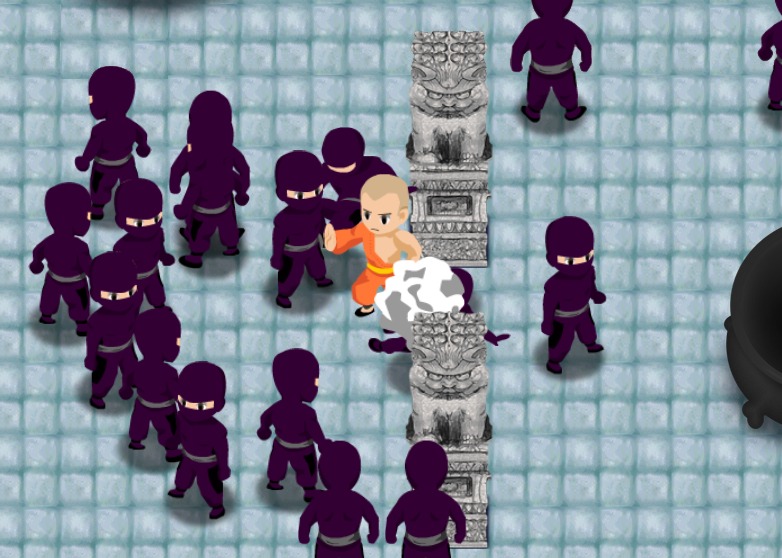
I recently helped my buddies Luxurious Animals launch a new HTML5 game demo called “Lux Ahoy”. The game, currently in beta, is a 2D physics-based action/shooter where two pirate ships take turns firing cannon balls at each other until one of the ships sink. What really sets this title apart is the stunning artwork as well as the play achieved through the design of each level. All the credit for creativity, design and game development goes to Lux and their fantastic team.

I was brought on just before launch to work on optimization and compatibility with mobile devices – iPad and iPhone being the primary focus. The game uses a combination of HTML5 Canvas and CSS to achieve layered animation. While some might choose to do everything in canvas or vice versa, Lux found a happy balance between both. As a late comer to the project, this is something I had to contend with. The majority of what I did to improve graphics performance was to ensure that DOM elements being animated with CSS were being treated as accelerated render layers in WebKit. Accelerated compositing had a big impact on all of the UI transitions as well as some in-game elements. I owe the techniques I used to Matt Seeley, an engineer at Netflix, and the talk he gave in January at the HTML5 Dev Conf.

While I left the HTML5 Canvas code alone for the most part, it’s worth mentioning that the game uses Grant Skinner’s EaselJS and SoundJS as well as other parts of his upcoming CreateJS framework. Most of my effort there was on SoundJS and making sure that HTML5 Audio would play on Safari. We also had to support background music on iOS where we’re limited to playback on only one audio channel which must be triggered by a user initiated event (on click).

I’d still love to take a stab at speeding up the canvas rendering or even porting the game’s sprite animations to accelerated rendering with CSS3. The canvas animation performance is acceptable as long as you’re running a recent version of iOS. I don’t recall hearing that Apple added accelerated canvas rendering to WebKit in iOS, but something is certainly better in iOS 5.1 than say 4.3.

I also helped with a few other details that I consider specialties of mine: social network widgets and Google Analytics tracking. We’re still watching and waiting for more results so please head over to luxahoy.com on your desktop or smart phone and let me know what you think!

Read the blog entry at luxanimals.com

JSHint for Sublime Text 2

The other day I setup a quick build system for Lux Ahoy based on jQuery’s Makefile. One of the nifty bonuses was the JavaScript syntax checker JSHint. It gives tons on tips on how to clean up your code, and may even detect potential errors. If you want to try it out, just head to jshint.com with some code ready to paste and get Linting!

To get the most out of a syntax checker I want it built into my text editor and maybe even run every time I save a JavaScript file. Enter JSHint for Sublime Text 2 and Sublime Package Control. JSHint for Sublime will output all of the linty goodness in Sublime Text’s console. All the instructions are there and if you haven’t added any packages to Sublime you’ll quickly get addicted. I’ve also installed SublimeLinter which highlights code inline. That should annoy me into cleaning up my code, or drive me to write everything in CoffeeScript!

After a couple of hours SublimeLinter turns out to be the perfect companion with fewer white space errors than JSHint for Sublime. Are those from jslint or an older version of jshint? Keep your columns Douglas Crockford!

Make Git Local and Remote Repo

I created a shell script the turns any folder into a git repo with a remote branch master. The process is based on the quick setup described on DreamHost’s Wiki.

The script can be used to easily initialize a local folder or take an existing local repo, and make the remote branch that will be used to push commits to pull down and merge code with team members.

Usage

I assigned the alias “mkgit” to the script for easy access from any directory. It accepts two parameters: a project name and remote host.

mkgit [project-name] [user@host]

$ cd my-project-dir
$ mkgit my-project user@host.com
 
'Not a git repository. Make it a repository? (y/n)'
$ y
 
'Initialized empty Git repository in ~/my-project-dir/
[master (root-commit) 954d600] initial commit
 0 files changed, 0 insertions(+), 0 deletions(-)
 create mode 100644 .gitignore'
 
'Create remote repository at ssh://user@host.com/~/git/my-project.git?
  (y/n)'
$ y
 
'Setting up remote repository at ssh://user@host.com/~/git/my-project.git'
 
'Initialized empty Git repository in ~/git/project.git/
Counting objects: 3, done.'
 
'Writing objects: 100% (3/3), 212 bytes, done.'
 
'Total 3 (delta 0), reused 0 (delta 0)
To ssh://user@host.com/~/git/my-project.git
 * [new branch]      master -> master
Branch master set up to track remote branch master from origin.'

mkgit.sh source

#!/bin/bash
 
# If the current dir is not a git repo offer to make it one
if [ ! -d .git ]; then
  echo 'Not a git repository. Make it a repository? (y/n)'
  read ANSWER
  if [ "$ANSWER" = "y" ]; then
    git init
    touch .gitignore
    git add .
    git commit
  else
    exit
  fi
fi
 
# Name remote repo using 1st param or current dir name
if [ -z "$1" ]; then
  PROJECT="${PWD##*/}.git"
else
  PROJECT="$1.git"
fi
 
# Use host specified in 2nd param or a default host
if [ -z "$2" ]; then
  HOST="user@host.com"
  echo "Create remote repository at ssh://$HOST/~/git/$PROJECT? (y/n)"
  read ANSWER
  if [ ! "$ANSWER" = "y" ]; then
    exit
  fi
else
  HOST="$2"
fi
 
echo "Setting up remote repository at ssh://$HOST/~/git/$PROJECT"
 
# Create a bare remote repository
ssh $HOST "mkdir -p ~/git/$PROJECT; cd ~/git/$PROJECT; git init --bare"
 
# Push to the remote repository
git remote add origin "ssh://$HOST/~/git/$PROJECT"
git push origin master
git branch --set-upstream master origin/master

Flip Pages with HTML5

Started out with jPageFlipper

  • added shading
  • added video pages with jPlayer (want to try JW Player or Video-JS)
  • Made the space before the first and last cover pages transparent instead of requiring background color to draw over the background
  • fixed iOS touch events (needs more work)
Further optimization could be done as well as a version that doesn’t require jQuery.

5 Crucial Lessons Learned by Watching Kids Play Video Games…

Some interesting points about conventions in video games that a lot of players would rather skip or just not put up with.

5 Crucial Lessons Learned by Watching Kids Play Video Games | Cracked.com

My take away was that “play” is more important than elements that may distract from, rather than enhance it (reading, cut-scenes, consequence).